Product page
What works today and what does not
The Lycism page for Makefold lists the working editors, the limits and how it is credited.
Open the product page ↗
Loading your next stop
Independent product · In progress
Flagship project
I want to keep the document, the spreadsheet and the presentation in the same window.
Current state
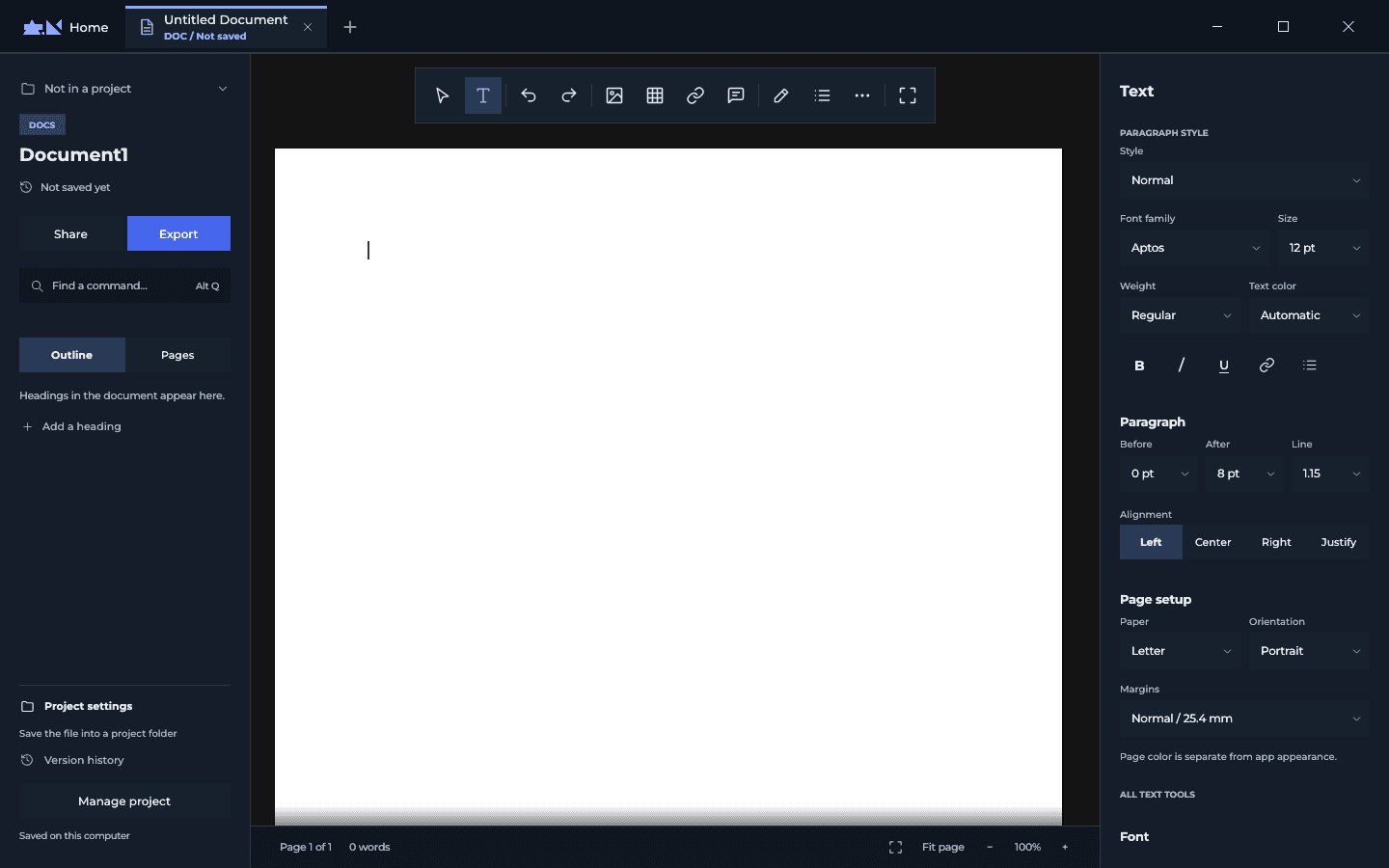
Makefold brings open-source editors for documents, spreadsheets, slides, PDFs and drawings into one desktop app. I am still working on how they fit together.
Evidence
The current state of the build, including what it cannot do yet.
Product page
The Lycism page for Makefold lists the working editors, the limits and how it is credited.
Open the product page ↗File support
| Editor | Files |
|---|---|
| Docs | docx, doc, rtf, odt, txt, md, html |
| Sheets | xlsx, xls, xlsb, ods, csv |
| Slides | pptx, potx, ppsx |
| CAD | dwg, dxf, svg |
From the current build.
Not yet
These are the gaps I am working through.
Scope
Counts from the current build. They describe scope, not usage.
My part
I wanted related files to stay together while I worked. Makefold grew out of that. I came up with the concept, worked out how the workspace should behave, designed the shell and layouts, and wrote most of the application code. AI helped with parts of the implementation along the way.
The editors inside it come from existing open-source projects. My work is the app around them: opening files, keeping the workspace together, and getting those editors to work inside it. Their licences and contributor credits stay with them.
Starting point
There is usually a spreadsheet behind a report, or references, drawings and PDFs beside a presentation. Those files belong to the same work, but I have to move between applications to use them.
I designed Makefold’s shell and editor layouts in Figma around that problem. I wanted to move between the files without losing my place.
Working build
The current app has Home and tabs for Docs, Sheets, Slides, PDF and CAD. Each tab keeps its editor state and styling when I switch away. Shared fonts and a colour for each file type help the different editors fit into the same window.
Docs has an outline, a floating toolbar and a properties panel. Sheets has formula controls and command menus. Slides has setup controls, notes and a slide strip. PDF and CAD have panels around their working canvas. These are the embedded editors running inside Makefold.
Integration
I do not want a cleaner interface to cost me a useful tool. The panels in Makefold send changes through each editor’s commands, so undo and the editor’s other behaviour can still work. The original ribbon is available from the overflow control.
The editors keep changing upstream. There is a sync process in the code so I can bring those changes in. Keeping Makefold’s panels separate makes that easier than mixing a large interface rewrite into each editor.
Still in progress
Parts uses SolidCraft and is further behind the other editors. Its existing docked layout runs inside Makefold, but I still need to build the Makefold layout and controls around it.
I am building for desktops and laptops. File compatibility and editor behaviour need more checking before release, especially as the upstream editors change. Snapshots help me inspect the layout; I still need to test the files themselves.
Next
That is the next test I want to get right with real documents, including switching tabs halfway through. The remaining integration work has to hold up through that whole sequence before I call Makefold ready.
Next
Tell me what you’re working on and what needs work.
Email meLet’s see if I’m the right person.
You don’t need to know exactly what you need. Tell me where you are, and I’ll help determine where I fit.
Curious how this was made?
Open the Hood ↗