Product page
What works today and what does not
The Lycism page for Boolcsa lists the working features, the limits and where it can be used.
Open the product page ↗
Loading your next stop
Independent product · In progress
Project in progress
I want to see what is available, what is due and what I am saving for.
Current state
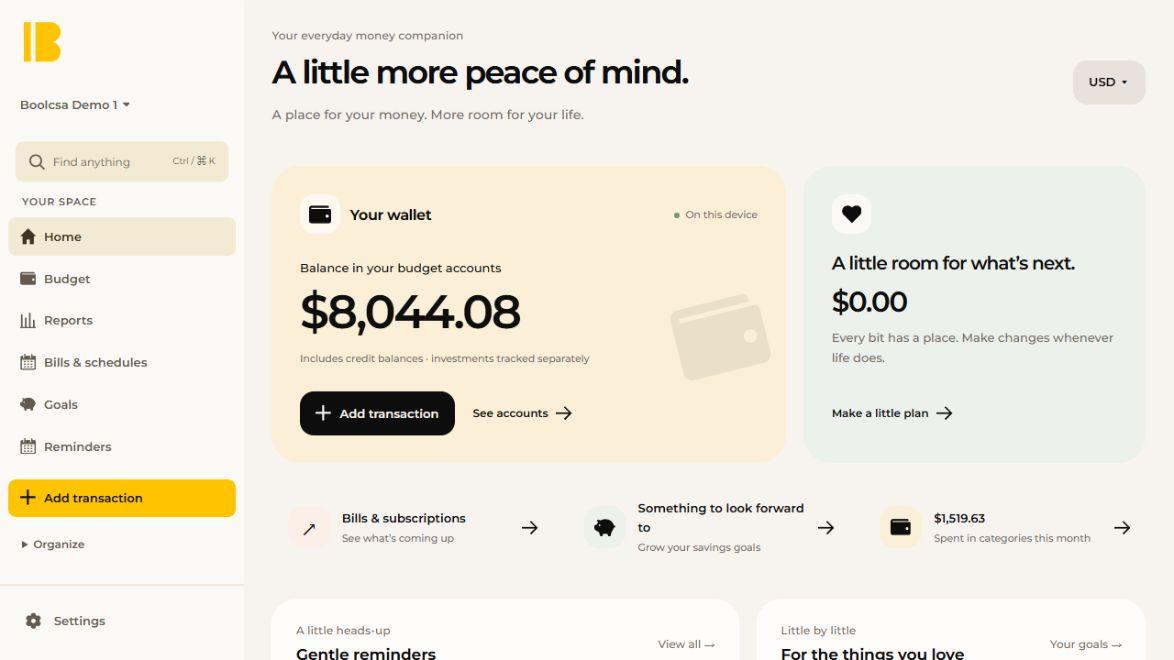
Boolcsa keeps transactions, bills, savings goals and reminders together. The web build works. I am still testing devices and preparing the native versions.
Evidence
The current state of the build, including what it cannot do yet.
Product page
The Lycism page for Boolcsa lists the working features, the limits and where it can be used.
Open the product page ↗Works today
The screenshot shows the demo budget. The figures are sample data.
Not yet
These come before any public release.
Credit
Boolcsa includes software derived from the Actual project, used under the MIT License.
Scope
Counts from the current build. They describe scope, not usage.
My part
I wanted a budget app that starts with the things I actually need to check: money, bills and goals. Boolcsa is my take on that. I chose the local-first approach, designed the flows and screens, and wrote most of the code, with some AI help to move the implementation along.
I am still working through how those pieces fit together and what needs fixing before release. The app and the decisions behind it are mine; the frameworks and storage tools it uses have their own authors and credits.
Starting point
I want the account balances, upcoming bills and money set aside on the first screen. Those are the things I need to check before digging into a report. That is what Home is arranged around.
Working build
The web build has budgets, accounts, transactions, bills, savings goals and reports. I can quickly enter an expense, income or transfer. Bill schedules can be edited, recorded, skipped or completed. The monthly review has a checklist that stays saved.
Reminders cover bills, income, savings and personal dates. I can snooze, dismiss, restore, pause or resume them. They work inside the app while it is open, without sending money or background push notifications.
Decisions
A budget does not need a remote API. Each installation keeps its own data, so moving to another device means exporting and importing it. There is no automatic cross-device sync yet.
Each budget has one currency. Changing that setting only changes the labels; it does not convert the amounts. I also need backup and restore to be dependable, because this is the copy of the budget someone is relying on.
Still in progress
There is a web/PWA build and an unsigned Windows test installer. Android has a configuration and build workflow, but I still need to finish the local SDK setup and test it on a device. On iOS, the current option is the Safari PWA, which also needs real-device checks.
I need to check installation, updates, recovery and offline use, then the smaller things: phone keyboards, screen edges and larger text. Reminders are device preferences and are not included when a budget is exported.
Next
I want to import a budget, add daily entries, work through bills, reconcile the accounts and finish the monthly review. Then I want to restore it into a separate copy and check what came back. That is the release check I still need to finish.
Next
Tell me what you’re working on and what needs work.
Email meLet’s see if I’m the right person.
You don’t need to know exactly what you need. Tell me where you are, and I’ll help determine where I fit.
Curious how this was made?
Open the Hood ↗