Live demo
Open the Andra rebuild
The workspace and the desktop, running locally in the browser.
Open artifact ↗
Loading your next stop
Product design · Development
Andra / Original product and rebuild
I was tired of checking several tools just to find out where a task stood. I started Andra to keep the task, its files and the conversation together.
Overview
I worked on the first version with a team from 2023 to 2025. In 2026, I started a separate rebuild. It has workspace pages, a desktop and full-screen apps on phones. For now, its business records stay in the browser.
I could put the tools together and still end up with too many things to search through.
Open the work
This opens the 2026 rebuild in your browser. Tick Use test data to load example records. What you enter stays on your device.
Live demo
The workspace and the desktop, running locally in the browser.
Open artifact ↗Scope
The app library belongs to the current rebuild. The team and QA figures describe the earlier internal project.
Timeline
The starting point
A task could be in the tracker, its files in cloud storage, and the latest decision somewhere in a conversation. Keeping up meant moving between messaging apps, office tools and spreadsheets.
When several tasks were moving at once, I could miss an update in my own tracker. To find out how the team was doing, I often had to ask people one by one.
table
| Before | What I wanted in Andra |
|---|---|
| Manual personal trackers | Tasks with a named owner |
| Files separate from requirements | Files beside the project details |
| Status assembled from conversations | Team progress in one view |
| Different navigation for each tool | One searchable workspace |
Select an image to see the details.
Two modes
The original product had an ERP-style page layout and an OS-style desktop. Some people preferred the pages. Others liked having several windows open. I kept both options.
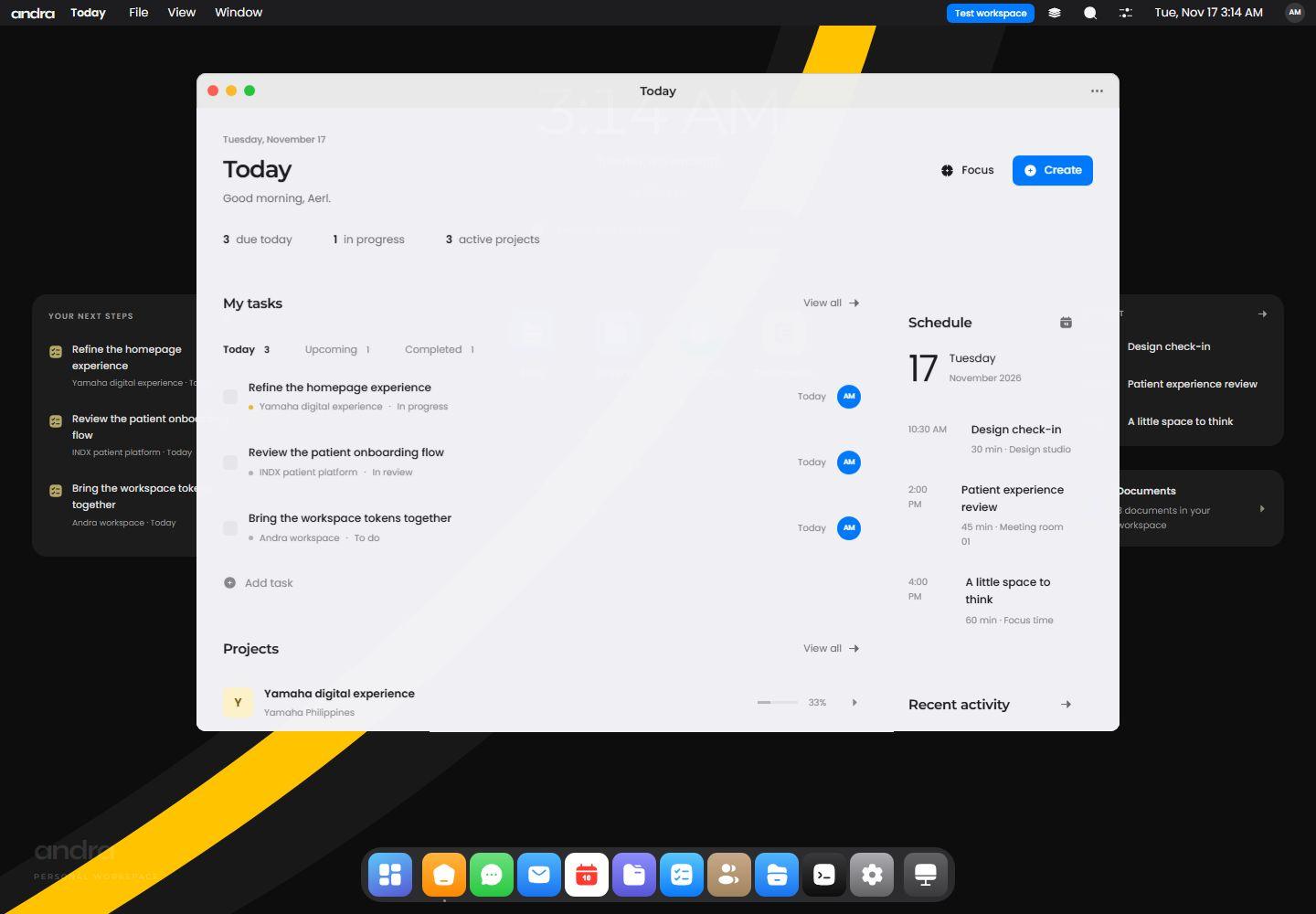
The rebuild keeps that choice. Workspace pages take you directly to the records. Desktop mode has separate app windows, saved layouts, a dock, and Spotlight search. On a phone, each app fills the screen.
The page and desktop layouts from the earlier product.
The current build
I can assign a task, give it a date and priority, add comments, and move it through a list or board. Completing it can be undone. A project keeps its tasks, members, documents and notes together, with progress worked out from the tasks. Scheduled work and editable events appear in the calendar.
Documents autosave. If edits conflict, the app keeps separate copies. The inbox shows workspace activity, and search covers people, projects, tasks and documents. A local automation can update a project when its last task is done.
Files and Terminal share the same browser filesystem. There are also records for CRM, purchasing, HR, QA, support, messaging and reports. These run locally. Sharing the work with a live team and connecting outside services are still ahead.
Captured from the 2026 rebuild. Names, projects, and figures are example records in the test workspace.
Internal use
Using the earlier internal version, I found it easier to get to a project’s files and conversations. I was interrupted less often by a search in another tool. I noticed the difference, though I did not measure the time saved.
My part
Andra started with my idea of how the work should fit together. I worked out the requirements, designed the pages and identity, and built the prototypes. I decided what belonged in the product and what could wait.
I also wrote most of the code, including much of the frontend and the backend connectors. AI helped me get through parts of the implementation faster. I still had to make the decisions and check how it all behaved. That work continues in the workspace rebuild.
There were eight of us in the original delivery: me, one PM, two engineers, two QA contributors, and two creatives. Their work is part of this story too.
Working with the team
Most of my coordination was with the PM and QA, then the creative team. We had daily standups, weekly planning, and reviews with design, engineering, QA and the people involved in the business.
The PM kept track of the schedule. Engineers worked from my designs, I directed the creative work, and QA checked it before and after development. I have kept the team members and client companies unnamed because that work is private.
Development
The rebuild uses HTML, CSS, and JavaScript served by Node. It does not need a frontend build step. Local mode works without an account or shared database, and each desktop app opens in its own window.
Hosted mode adds accounts and organisations through PostgreSQL. Business records still stay on each device. Signing in does not yet make those records shared between people.
Connected records
An invoice starts as a draft with items, quantities, discounts, taxes and terms. Issuing it fixes those details. When I record a partial or full payment, the related Finance transactions and cash totals update too.
Amounts are stored in minor units, such as cents, and rounded per line. Each currency keeps its own total. Draft and void invoices stay out of receivables. Recording a payment only updates the records; it does not transfer money.
Record flow
Draft → issue → record payment → update the ledger and balance. Voiding an unpaid invoice removes it from receivables.
Trying the build
The welcome screen starts empty. Choosing test data opens a separate example profile, which is what I used for the rebuild screenshots. I can back up and restore local records, though Files and Finance have separate export limits.
Shared business records and syncing still need work. Email delivery, hosted meetings, payment processing and scheduled server jobs also need outside services connected.
Visual choices
I borrowed from macOS and iOS for the rebuild: flat surfaces, system colors, rounded app tiles and a blue accent. I kept the Andra mark yellow and black. Type and spacing help separate navigation, records and smaller details.
The brown-and-gold screens show the earlier design. In the rebuild, people can change the appearance, density, focus, and reduced-motion settings.
Desktop and phone
Desktop windows can be moved, resized with a pointer or keyboard, minimized, tiled, and reopened in their saved positions. The dock shows running apps and pinned favorites. Spotlight searches both apps and records.
The phone interface uses an app grid, a dock, and full-screen views with a home gesture. It adjusts to the visible area when the keyboard opens. I wanted the phone version to work without having to manage small desktop windows.
Feedback
For the original product, we did research and usability work with project managers, developers, QA, creatives, administrators, HR and executives.
Too many menu items came up repeatedly. People were interested in the product, but some overlooked OS mode and others saw it as a gimmick.
OS mode is one of my favorite parts. That feedback was still useful. I needed to keep a straightforward way to get work done for someone who did not share that preference.
Looking back
Andra grew well beyond the problem I started with. The crowded menu made that obvious. I had brought the tools together, but people could still struggle to find the one they needed.
That is why the rebuild has search, a categorized app library and records that update each other. I still need to see how it holds up with a live team. The next thing to find out is whether people can get through their work more easily.
AERL MRTN / ANDRA
Tell me what people need to do in it, and where the current setup gets in their way.
build@aerlmrtn.comAerl Martin Jimenez · Founder, product and creative lead, lead designer and engineer.
Let’s see if I’m the right person.
You don’t need to know exactly what you need. Tell me where you are, and I’ll help determine where I fit.
Curious how this was made?
Open the Hood ↗